Redirect Handling
The redirect handling is done using the callback URL configured in the Settings section.
This URL receives payment event notifications in real time whenever the payment status changes. CellPay sends POST requests to the configured callback URL for payment events.
Callback URL Setup
The merchant must configure the callback URL in the CellPay portal before starting the integration. This URL acts as the endpoint where payment notifications are received.
Once configured, CellPay will send real-time payment updates to this URL whenever the transaction status changes.
Payment Notification Behavior
The callback URL is triggered by POST requests and is used to notify the merchant about the current payment state.
Example event types:
successfailurepending
These notifications are delivered in real time so the merchant can update the order status immediately.
Sample Screenshot to set up Callback URL
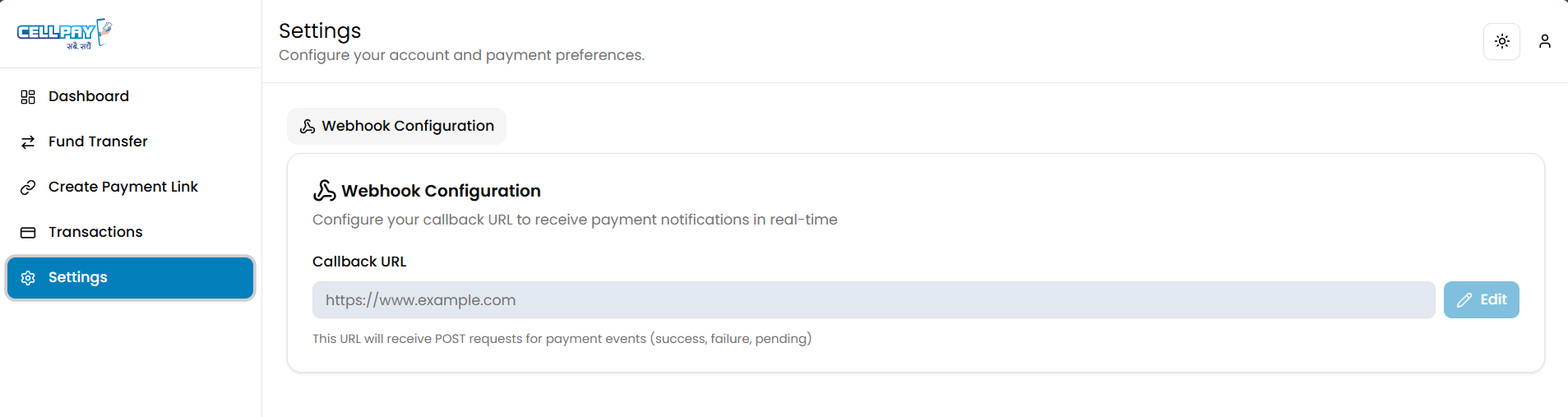
- The callback URL must be configured in Settings.
- CellPay sends payment notification data as
POSTrequests. - The notifications are real-time and should be handled promptly.
- The callback must be secured and able to receive payment event payloads reliably.